
Where can I find an overview of all of my users?
- Click ‘Users’ in the left side bar
- In the subcategories select ‘All Users’
This will take you to a page with a table showing you all the users that have been added. In this view you also have a few handy tools to help you find users.
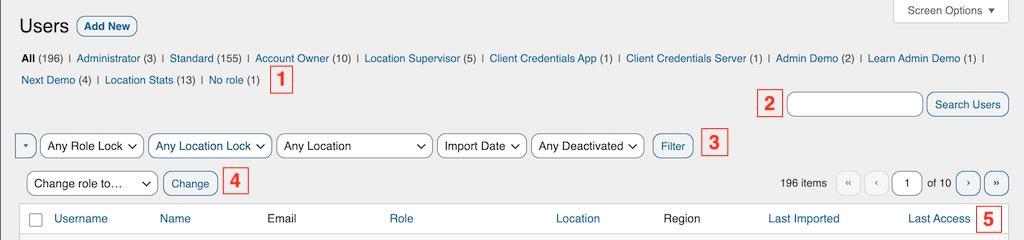
- Filter by role. At the top of the page you'll see all the roles you have listed, and by clicking on one you the list will be filtered to show only that specific role.
- Search. Here you can enter a partial name and search for users that way.
- Choose what you want to filter on (you can select more than one), and when you click Filter the list will be updated
- Bulk change role. Select a role in the dropdown and the users you want to change the role for. When you click Change, all the selected users will change role.
- In the table you can see when users last accessed the system and when they were imported.